The new software for pet transport and pet taxi services
We’re glad to introduce our new software for pet transport.
It lets you manage pet pickups and deliveries and easily plan your transport route.
It’s very interesting, because it connects with the rest of the applications, so that at the time of making a service, booking, PetShop sale, puppy booking, etc. you can also add a pickup or delivery quickly.
Transport planner and route sheet
By selecting a day, you will see the pickups and deliveries planned for that day.
If you have multiple apps, you can see them all or filter by app. For example, if you only want to see grooming pickups or pet shop deliveries.
The information is organized in two independent tabs, to help you better visualize the pickups and deliveries. Next to the name of each tab appears the number of pickups/deliveries.
To rearrange the trips, just drag and drop them into the position you want.

Pet transport planner and route sheet
If the customer has an address, the GoogleMaps map appears. By clicking on the Enlarge map option, a new browser tab opens with the map in larger size. In this way, you can see the address and order the shipping according to proximity or as you prefer.
By clicking on the DETAILS button, a Pop-up with more information opens:

Information for contacting the customer quickly
It includes quick access links. When you click one, the information opens in a new browser tab:
Customer’s name: open its file
Map: open GoogleMaps with the map in larger size
Name of the animals: open their files
Detail of the appointment, reservation, service, stay, puppy or ticket: open the corresponding section.
It also includes buttons for direct contact with the customer. You can:
Call the customer by phone
Send the customer an email
Open WhatsApp to talk to the customer
At the bottom, you can print the route sheet with the complete list of trips in order and send it by email, for example to the driver.
If you check the “Send me a copy” option, you will also receive the route sheet in your email.
Reports and graphs
Wouldn’t it be great to know the number of trips, for example, for the last month?
In the transport report, you can select a date range and a business area (hotel, grooming, PetShop, …) and all the pickups and deliveries between those dates will be listed.

Pet transport report
By clicking on the table titles, you can sort the results to sort them by customer name, address, type, date, etc.
If you click on a customer’s name, that customer’s file will open in a new web browser tab.
At the top there are graphs that show the total number of trips, how many correspond to pickups (for example 40%) and how many to deliveries (for example 60%) and the evolution of the number of pickups and deliveries by weeks or months depending on the date range selected.
Integrates with the rest of the apps
You can select if a service/sale has a home collection/delivery service and automatically, it will be noted in the transport schedule, when you go to add a:
new pet grooming appointment or service
new pet training/education appointment or service
new pet daycare booking or stay
new pet hotel booking or service
new reservation of a puppy from your kennel
new pet shop sale
In addition, you’ll see specific notifications on the Home Page for each application:
For the Hotel and Nursery software, if a stay that begins that day (Check-in) or a stay that ends that day (check-out) has a pick-up service

Daily pet transport schedule
From the Grooming software, if a service for that day has a pick-up or delivery service:
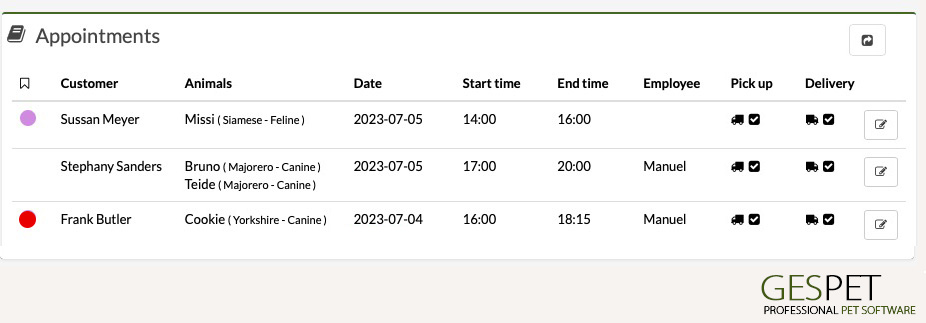
Pet transport for grooming appointments
If there are puppies scheduled for delivery on that day and you have selected the home delivery service, they will appear on the homepage to notify you that the transportation is scheduled for that day.

Pet transport service for breeders
From the PetShop software, if you select home delivery service when making a purchase, a notice will appear on the homepage that day.
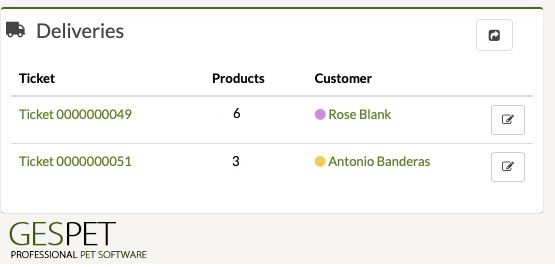
Delivery for pet shop software
Did you find it interesting?
If you have any questions, you want to propose that we write a help guide or a post on a topic or you just want to chat with us, don't hesitate. We are delighted to talk with you and get your opinion.