The new software for pet trainers and ethologists
We'd like to introduce our software for pet trainers, with a fresh look and many new features.
We have redesigned the most used screens in the software, making everyday tasks (appointments and services) much faster.
You do not need to start working today with the new screens. You can continue working with the old ones and gradually try the new ones. Take your time to explore them.

- Improved planning
- You can configure the hours shown in the planner.
- If you want, you can also see past appointments in the planner.
- If you identify your employees with a color, you will see that appointments / services are assigned to that employee. For example, Juan’s appointments have a red background and Ana’s have a blue background.
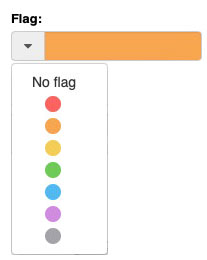
- If you use a color flag to identify an appointment / service, you will see it in the planner.
- Now you can drag and drop appointments to change their time or day.


The appointments and services
- They are faster and now include much more helpful information.
- You can also start multiple services quickly.
(Imagine that 10 animals have just arrived and you want to start working quickly. You can start all those services quickly)

Optimized design
- We have slightly redesigned the screens. Now they include more information, but we have organized it in collapsible blocks to make the most of the screen.

Customizable emails
Now you can customize the information that appears at the bottom of the emails that you send from the software.

You can send WhatsApp messages and make phone calls
- to your customers directly from the booking, check-in or check-out processes.
Just click the customer's WhatsApp number or phone
number to start the phone call.

Highlighted information
- The sections holding additional information about customers and animals are highlighted if you have entered information.


Customer's address map
- Do you need to calculate the distance to the customer's address to assign the corresponding rate? Now it's very simple, because you can see the map with customer's address.

Quick addition
- When you're adding a new appointment or service in the system, if the customer or pets are not in your database, you can add them quickly without leaving this screen.
You can also fill in data protection (GDPR) information when you add a new customer.

Check before adding a customer
- When adding a new customer, check if the ID number and the email address are in the database (so the customer already exists).

Discounts
- In appointments, services, ... now you can include discounts for different concepts expressed in % or in amount. (For example -10% on the bath service for the second animal or $6 off transport).


Colors
- If you use a color flag to identify an appointment / service, you will see it in
the planning.
If you identify your employees with a color, you will see that
appointments / services are assigned to that employee. For example, Juan's
appointments have a red background and Ana's have a blue background.

Do you need a calculator?
- When you finish the service, a calculator shows the amount paid and automatically calculates the change due.


The Invoice
You can print it, but if you prefer, you can also send it directly via email.
Faster Invoicing
We have removed the service completion document as a prerequisite for the invoice. Now it's faster, and the sales document or invoice is generated directly upon service completion.
GDPR - Privacy Policy

Before sending an email from the software, it checks if the client has consented to receive communications, and if not, it displays a notice on the screen.
You can directly access their profile to update this consent.
ONLINE BOOKING
Customer WhatsApp number
In online appointments, the client's WhatsApp field has been added.

Cancel an online appointment request
Send a cancellation email to decline a customer's online appointment request, with the reason and any other details you want to include.

Keep an email copy
You can receive a copy of online appointment confirmations and cancellations by email.

Attach the appointment summary
When you confirm an appointment by email, you can attach its summary sheet.
Add a new customer while confirming
If the customer does not yet exist, you can add them and their pets while confirming the online appointment. Gespet checks for an existing customer record.
ALL IN ONE SCREEN!

New Pet Training Appointment Screen
Did you find it interesting?
If you have any questions, you want to propose that we write a help guide or a post on a topic or you just want to chat with us, don't hesitate. We are delighted to talk with you and get your opinion.