Clearer invoices and easier payments for your pet business
Clearer invoices, a more professional image
Whether you are handing over an invoice at your grooming salon or at the end of a boarding stay, you want the details to be clear: which service you provided, which pet it was for and how much is still due. You also want a well-presented document with the right business information.
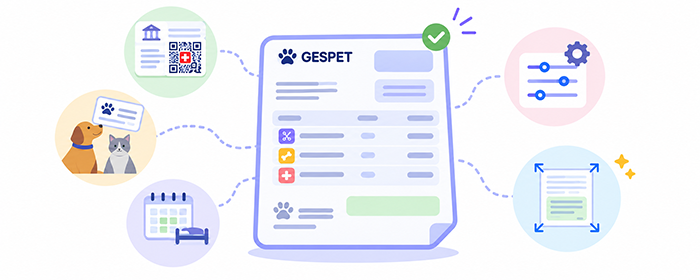
The latest Gespet updates bring those needs together: more options for tax and business details, payment slips with bank details or QR-Rechnung, pet and service information, and a refreshed layout that makes better use of space. Fewer questions after handing over the invoice, and a more professional look for every document.
Bank details
QR-Rechnung
Room for the tax and business details you need
You can now add more information to your invoices: legal entity type, trade register details, additional tax IDs and business notices. This gives you room to include the information relevant to your company and the country where you operate.
For example, you can add Registro Mercantil, Handelsregister, RCS or Registro Imprese and REA details, along with identifiers such as NIPC, CNPJ, BN/NE or EIN, as appropriate for your business and country. These options let you include the information your business needs, with the flexibility to tailor it to the requirements in your country.
You can also set up standard text for all invoices and separate notes for invoices issued with or without taxes, such as payment terms, tax notices or exemption details. Set up the wording for each case once, and the system automatically applies the appropriate text.
If you have yet to organize this information, see how to keep business and billing details separate in Gespet.
Make payment easier with bank details alongside the invoice
When a customer needs to make a bank transfer, including the instructions with the invoice helps them find what they need without asking you to send the account details separately.
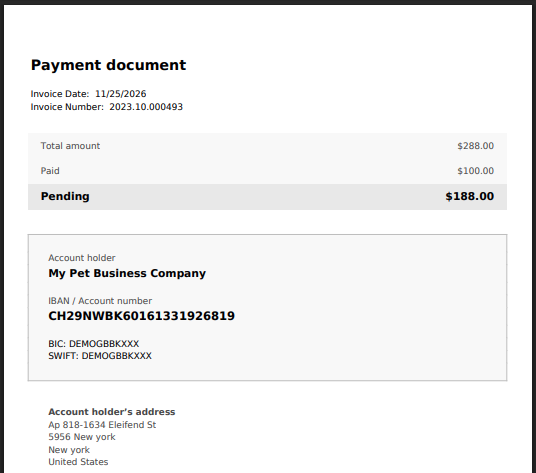
You can now add a payment slip and choose between two formats:
Bank details: include the account holder, account number and any additional instructions, such as BIC/SWIFT or bank information.
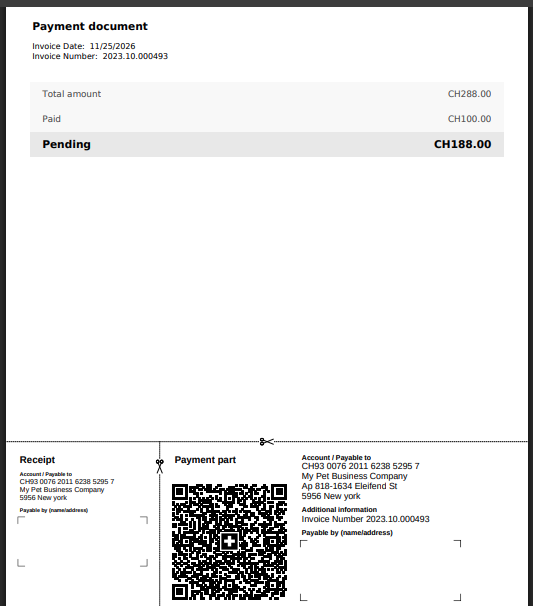
QR-Rechnung, also known as Swiss QR Bill: customers can scan the QR code with a compatible banking app to fill in the payment details. This option supports EUR and CHF with a compatible bank account in Switzerland or Liechtenstein.
You choose whether to enable it for all payment methods or only selected ones. It is added on a separate page, only when there is an outstanding balance, and shows the total, the amount paid and the balance due.
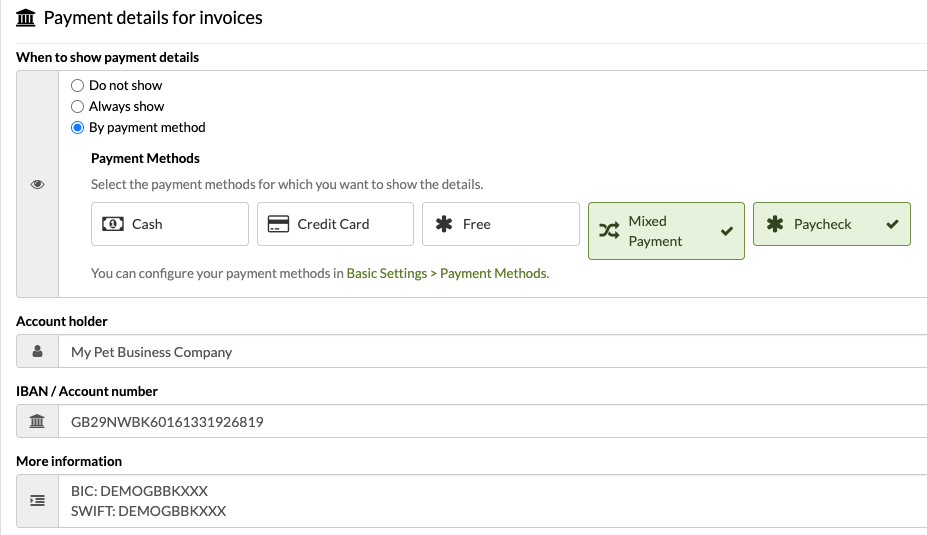
Choose when to show payment details and add your business bank information.
For example, if a boarding stay costs €180 and the customer has already paid €60, the slip clearly shows the remaining €120 alongside the details needed to make the payment.
Make each sale, service and pet easier to identify
Details matter when a family brings in several pets or looks back at an invoice later. New invoices include stay, service or sale dates and, where applicable, the available details of the animals involved: name, species, breed, sex and microchip number.
For a boarding business, this helps connect the invoice to the stay and the pets you looked after. For a grooming salon, it helps identify the pet and service it relates to.
For veterinary clinics, identifying the pet on the invoice can also help customers with insurance claims: some insurers ask for the pet’s name and microchip number to process reimbursement. Depending on the country, veterinary invoicing rules may also require certain animal details, such as the species. Including this information helps document which animal received care and prepare more complete invoices in line with the applicable requirements.
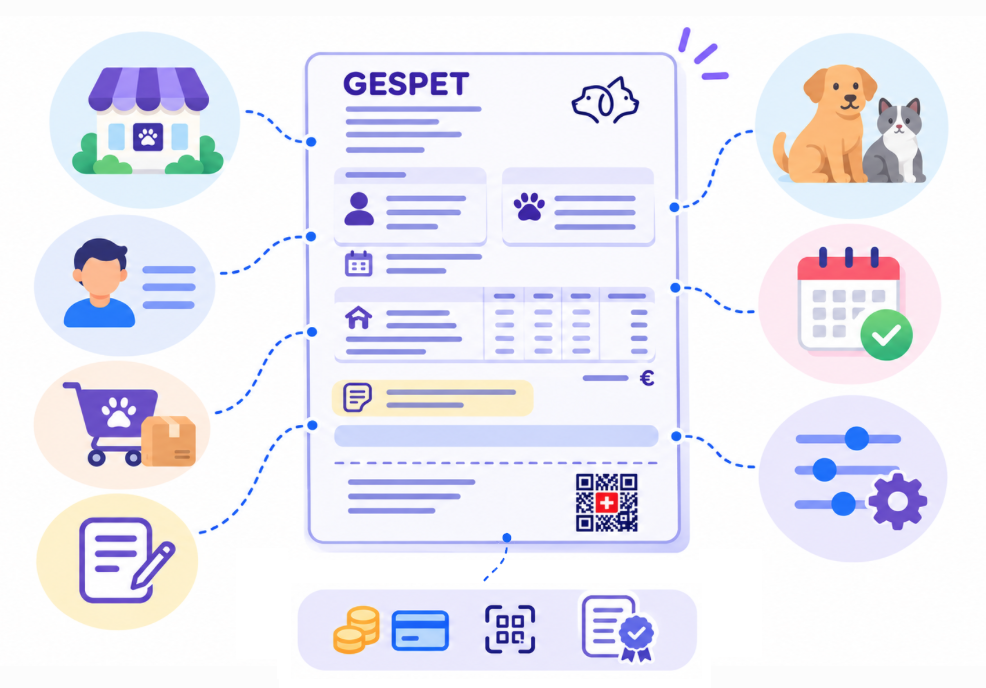
More business and service information, with options that help customers make their payment.
Clearer documents that make better use of space
The updated layout goes beyond invoices. We have also refreshed printed delivery notes, bookings, appointments, check-ins, check-outs, services, orders and Pet Shop purchases.
Headers, sections and tables are easier to read and use space more effectively. This reduces unnecessary page breaks without compromising readability, making information easier to find when handing over a booking document, reviewing a service or checking a purchase.
Invoice information stays the same when you reprint it
Your business tax details, logo and invoice text remain as they were when the invoice was issued, even if you later change your settings. This prevents unintended changes when reprinting, preserves an accurate record of what you gave the customer and helps you meet the invoice retention and integrity requirements that apply in your country.
Public and private notes: share the right information and keep internal details for your team
A clarification for a customer serves a different purpose from an internal observation. Gespet lets you keep the two separate, giving your team the context they need while each document shows the information you want to share.
Public notes: use the Notes field to add details or instructions you need to share with customers and suppliers, and to include necessary information on invoices. These notes appear on the document its recipient receives.
Private notes: record observations for your team. The Internal use only label identifies these notes, which are not included on documents sent to customers or suppliers.
Public and private notes are available for appointments, bookings, check-ins, check-outs, consultations, services and invoices, as well as returns, supplier orders and purchases in Pet Shop.
For example, if your pet shop returns two defective fresh food items, you can include the return reference in the public notes. In the private notes, you can explain to your team what happened and when you noticed the problem, as shown in this screenshot.

Private notes keep the context available to your team; public notes preserve the information included on the invoice.
Icons and help text make it clear who can read each note. Once an invoice has been issued, the public notes included on it are protected from changes. Private notes remain editable, so you can update your internal follow-up after invoicing without changing the original document.
Give the final step of the service the same care
Customer care does not end at pickup. An easy-to-understand invoice and clear payment instructions are part of the experience too. If you already use Gespet, review your billing details and choose how you want to present your payment slip.
If you are looking for software to manage your pet business, try Gespet and see how your everyday work connects with more detailed invoicing.
Try Gespet for free1. Can I include pet details on my business invoices?
2. How can I add more tax information to my invoices?
3. Can I attach bank details only when a customer still has a balance to pay?
4. What do I need to use QR-Rechnung or Swiss QR Bill?
5. How do public and private notes differ, and which ones can customers see?
6. Will changing my business details affect invoices I have already issued?
Note: Gespet provides tools to help you manage your business day to day. The information in this article is general and does not constitute legal or tax advice. Each user is responsible for configuring and using the software in accordance with the rules and regulations applicable to their business activities and country. If you have questions about invoicing, taxes, exemptions or other obligations, we recommend consulting a qualified professional or the relevant authority in your country.
Was this helpful?
Have a question, a suggestion for a guide or a blog post, or something you would like to share? We would love to hear from you.