
Employee Schedule and Availability Settings
Your planner is now more advanced, so you can stay in control
In a pet grooming salon or dog training centre, each professional can have a different routine: some work mornings only, others work split shifts, and some are available only on specific days of the week. On top of that, everyone has days off.
That makes it easy to schedule an appointment on a day when a professional is not working, or to let several appointments overlap without noticing.
To prevent this, we have added a new feature that lets you:
Set a schedule for every employee

Set their non-working days

Work with smart availability validation
The result is a clearer planner, fewer mistakes, a better customer experience and more time to deliver excellent care to pets and their families.
Set every employee's schedule
Each employee record now includes the new Schedules and
Non-working days sections.
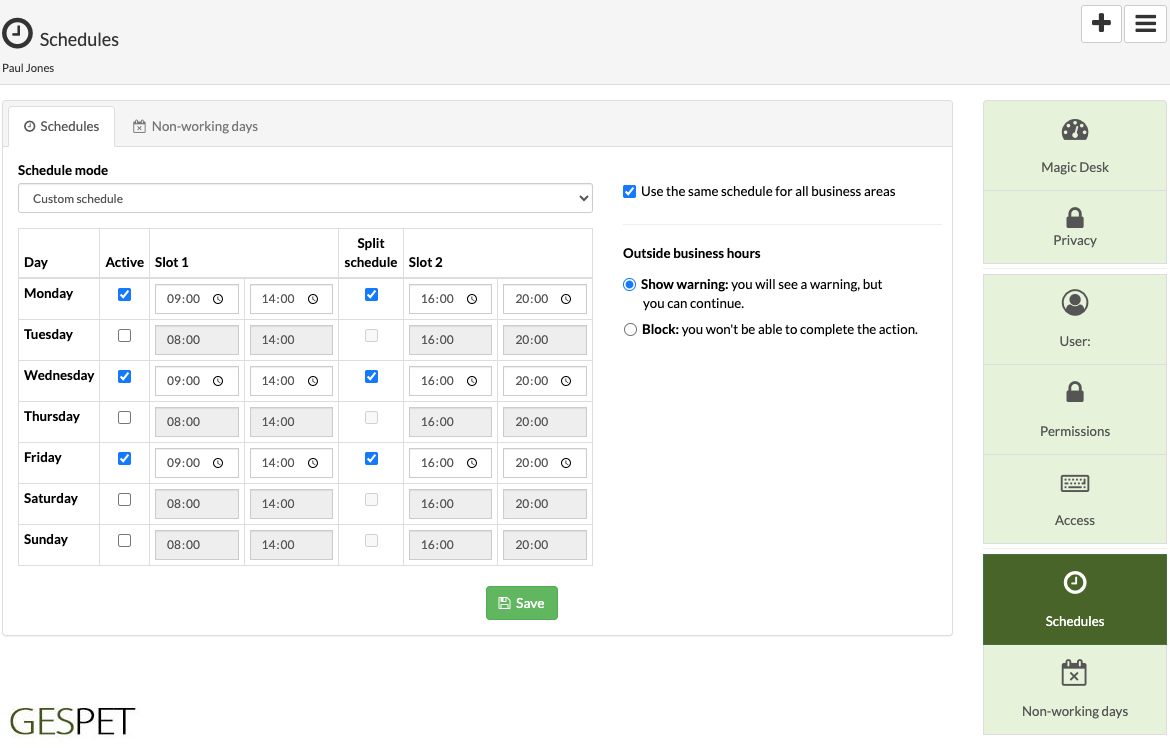
When you add an appointment or service outside an employee's working schedule, you decide how Gespet should respond:

Show a warning
but still allow the appointment or service

Or block it
so it cannot be added
There is no single ideal option for every business or every employee. Every team works differently, so Gespet gives you the flexibility to choose the setting that best fits your workflow.
We give you the tools, but you decide how to use them in your business.
Show a warning: ideal when your business or team needs more flexibility.
Block it: ideal when you want stricter rules and do not want anyone to work outside established days and times.
You can choose the option that suits your needs and change it whenever you need to.
It takes only a few minutes to set up and can save a huge amount of time and effort in day-to-day management.
Set holidays and non-working days for your team
Alongside your business non-working days, you can set individual employee non-working days for:
Holidays
Days off and absences

Sick leave

Training
You no longer have to remember those unavailable dates or check another tool before scheduling a new appointment.
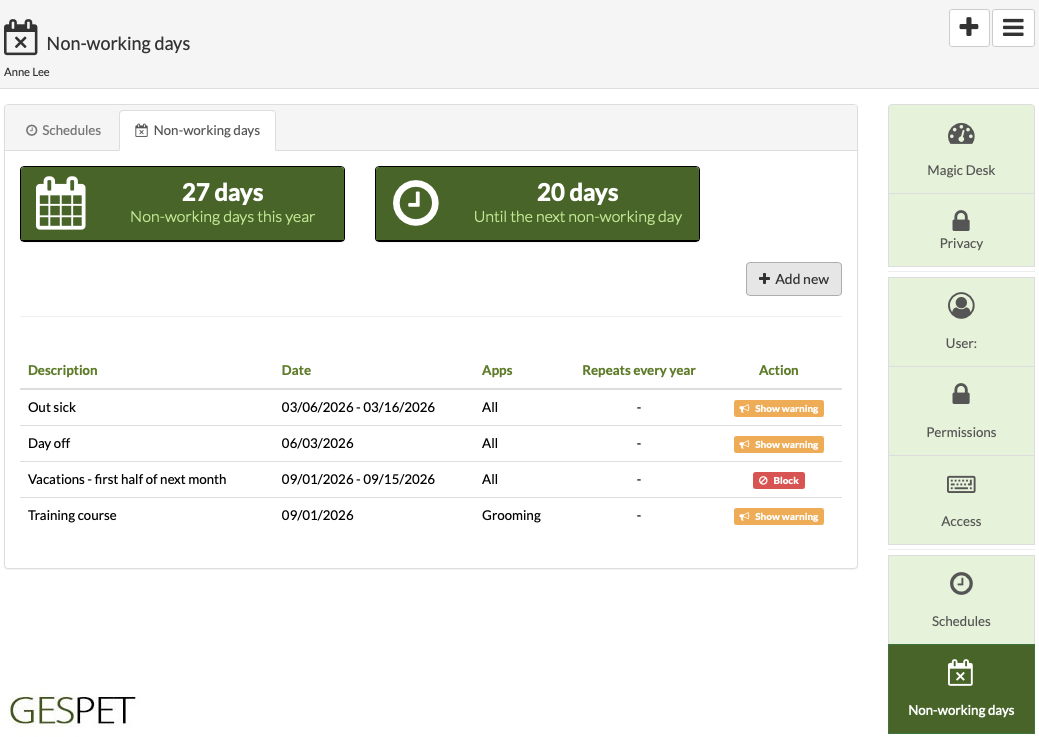
Set a single day or a date range, such as August 1 to August 15 for holidays.
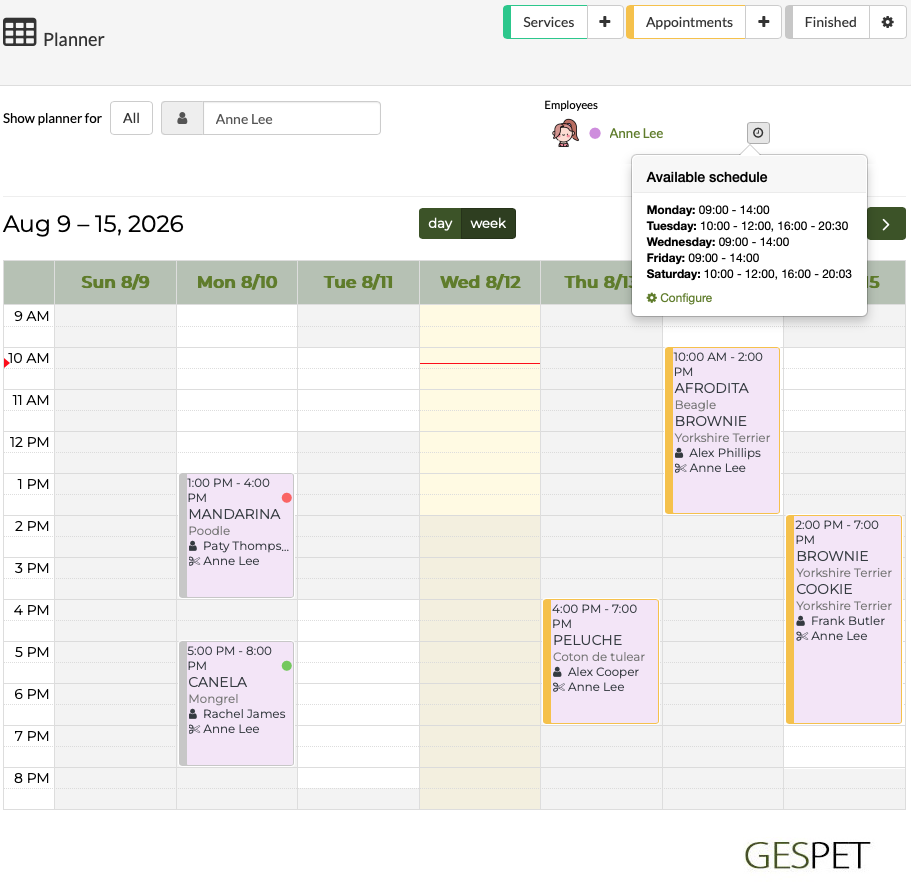
Planner by employee is now much more visual
In the Pet Grooming and Dog Training apps, you can view the full planner or focus on a specific employee.
When you select an employee, you will now see:
Their schedule, with a direct shortcut to update it quickly.
Clearly marked non-working days for both the business and that employee.
The employee's working hours, so you can quickly choose the right day and time when adding an appointment.
You can review the agenda, move services, spot open slots, make the most of last-minute opportunities and reorganise the week more efficiently.
Now with smart availability validation
When you add, edit or move an appointment or service with an assigned employee, such as a groomer or dog trainer, Gespet checks:
The employee's availability:
Working days and hours.
Non-working days.
And the work already assigned to that employee.
This helps you avoid assigning appointments or services outside an employee's schedule, on a day they are not working, or on top of other work.
Case 1: direct protection.
Mary has an appointment scheduled for Tuesday at 10:00.
Gespet will not allow another appointment or service for the same employee on the same day and at the same start time, preventing an obvious duplicate.
Case 2: a smart warning.
James has an appointment on Monday from 10:00 to 12:00.
When you add another appointment for James on Monday from 11:00 to 13:00, Gespet warns you about the overlap and shows the details.
It does not stop you from adding it, because some services can genuinely be carried out at the same time.
Case 3: no overlap.
Paul has an appointment on Monday from 10:00 to 12:00.
You add another appointment for Paul on the same day from 12:00 to 13:00.
Gespet allows it because the appointments do not overlap: the new one starts as the previous one finishes.
This applies when appointments and services are added, edited or moved. Gespet only blocks work that starts at exactly the same time; in the remaining cases, it warns you so you can make the decision that best fits your professional judgement.
Employees and users are now connected
These new capabilities are part of Gespet's user security and access control module.
This module is designed for businesses with multiple users and lets you:
Create users with separate login details.
Set the days and hours when each user can access the system.
Choose which areas of Gespet they can access and restrict the rest.
Review their access history.
It now also lets you link a system user to an operational employee and manage that employee's schedules and non-working days.
Try it free
Did you know you can also configure business hours and non-working days?
1. Can I configure a different schedule for each employee?
2. What happens if two appointments or services overlap?
3. Can I record employee holidays and days off?
4. Does the Planner show the selected employee's schedule?
5. Do I need Users and Permissions to use employee availability?
Did you find it interesting?
If you have any questions, you want to propose that we write a help guide or a post on a topic or you just want to chat with us, don't hesitate. We are delighted to talk with you and get your opinion.